
CC1101 Low-Power Sub-1 GHz RF Transceiver
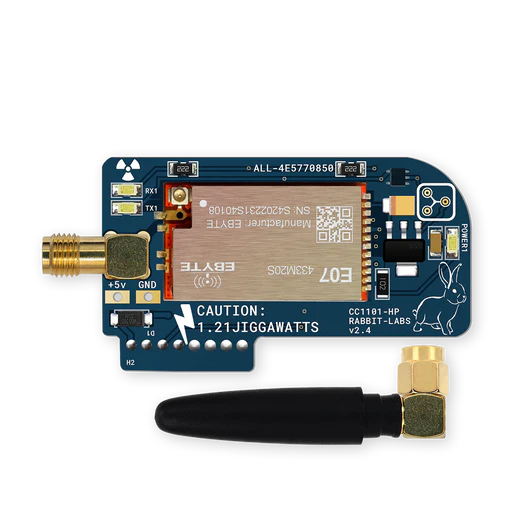
The CC1101 component provides a driver for the Texas Instruments CC1101 Sub-1 GHz RF Transceiver (datasheet). The CC1101 is a low-cost, low-power radio chip commonly used for wireless communication in the 300-928 MHz frequency bands, including the popular 315 MHz, 433 MHz, 868 MHz, and 915 MHz ISM bands.
The CC1101 supports multiple modulation schemes (ASK/OOK, 2-FSK, 4-FSK, GFSK, MSK), configurable data rates from 600 to 500,000 baud, and adjustable output power from -30 dBm to +11 dBm. It connects to ESPHome via the SPI Bus and integrates with the Remote Transmitter and Remote Receiver components for encoding and decoding RF protocols.
Component Configuration

# Minimal Example
cc1101:
  cs_pin: GPIOXX
  frequency: 433.92MHz
Configuration Variables
Hardware Settings
- cs_pin (Required, Pin): The SPI Chip Select (CSN) pin connected to the module.
General Settings
- frequency (Optional, frequency): The operating frequency.
Range:
300MHzto928MHz. Defaults to433.92MHz. - output_power (Optional, float): The transmission power in dBm.
Range:
-30to11. Defaults to10. - modulation_type (Optional, enum): The modulation format.
Options:
ASK/OOK(default),2-FSK,4-FSK,GFSK,MSK. - symbol_rate (Optional, int): The symbol rate in Baud.
Range:
600to500000. Defaults to5000. - rx_attenuation (Optional, enum): Internal RX attenuation.
Options:
0dB,6dB,12dB,18dB. Defaults to0dB. - dc_blocking_filter (Optional, boolean): Enable the digital DC blocking filter. Defaults to
true.
Tuner Settings
- filter_bandwidth (Optional, frequency): The receive filter bandwidth.
Range:
58kHzto812kHz. Defaults to203kHz. - fsk_deviation (Optional, frequency): Frequency deviation for FSK/GFSK modulation.
- channel (Optional, int): Channel number (added to base frequency). Defaults to
0. - channel_spacing (Optional, frequency): Spacing between channels. Defaults to
200kHz. - if_frequency (Optional, frequency): Intermediate Frequency. Defaults to
153kHz. - pktlen (Optional, int): Packet length configuration. Sets the expected packet size for
fixed-length packet mode. Range:
1to255. Not typically needed for OOK/ASK modulation.
AGC (Automatic Gain Control) Settings
Advanced users can fine-tune the AGC dynamics. The AGC automatically adjusts receiver gain to handle signals of varying strength. These settings control how aggressively and quickly the gain adapts. See the CC1101 Datasheet for detailed information.
- magn_target (Optional, dB): Target signal amplitude for the AGC loop. Higher values increase
sensitivity but may cause clipping on strong signals.
Range:
24dBto42dBin increments of 3 (e.g.,33dB). Defaults to42dB. - max_lna_gain (Optional, dB): Limits the maximum LNA (Low Noise Amplifier) gain. Use to prevent
saturation in high-signal environments. Defaults to
Default. Options:Default,2.6dB,6.1dB,7.4dB,9.2dB,11.5dB,14.6dB,17.1dB. - max_dvga_gain (Optional, enum): Limits the maximum DVGA (Digital Variable Gain Amplifier) gain.
Options:
Default,-1,-2,-3. Defaults to-3. - lna_priority (Optional, boolean): If true, reduce LNA gain before DVGA gain when decreasing
overall gain. Useful for optimizing noise figure. Defaults to
false. - carrier_sense_abs_thr (Optional, int): Absolute RSSI threshold for carrier sense. The radio considers a carrier present when RSSI exceeds this level.
- carrier_sense_rel_thr (Optional, enum): Relative RSSI threshold for carrier sense, compared
to the current noise floor. Options:
Default,+6dB,+10dB,+14dB. - filter_length_fsk_msk (Optional, enum): Averaging length for AGC in FSK/MSK modes.
Longer values provide more stable gain but slower response. Options:
8,16,32,64. - filter_length_ask_ook (Optional, enum): Averaging length for AGC in ASK/OOK modes.
Longer values provide more stable gain but slower response. Options:
4dB,8dB,12dB,16dB. - freeze (Optional, enum): Controls when AGC gain is frozen (held constant).
Options:
Default,On Sync,Analog Only,Analog And Digital. - wait_time (Optional, enum): Time to wait after a gain change before allowing another adjustment.
Options:
8,16,24,32. Defaults to32. - hyst_level (Optional, enum): Hysteresis level to prevent gain oscillation on borderline signals.
Options:
None,Low,Medium,High.
Actions
This component provides actions to control the radio state, primarily used for coordinating transmission.
- cc1101.begin_tx: Puts the radio into TX mode. Must be called before transmitting.
- cc1101.begin_rx: Puts the radio into RX mode. Call after transmitting to resume receiving.
- cc1101.set_idle: Puts the radio into an idle state. In single-pin configurations, this should be called before switching between TX and RX modes to ensure clean state transitions.
- cc1101.reset: Resets the CC1101 chip and re-applies configuration.
Integration with Remote Receiver/Transmitter
The component automatically configures the GDO pins to support both dual and single pin wiring schemes without any extra configuration.
1. Dual Pin Wiring (Recommended)
This is the simplest and recommended wiring scheme. It uses separate pins for transmitting and receiving data.
- GDO0 (Module Pin 3): Connect to the MCU pin used by
remote_transmitter. - GDO2 (Module Pin 8): Connect to the MCU pin used by
remote_receiver.
cc1101:
  cs_pin: GPIOXX

remote_transmitter:
  pin: GPIOXX # Must match GDO0
  carrier_duty_percent: 100%
  on_transmit:
    then:
      - cc1101.begin_tx
  on_complete:
    then:
      - cc1101.begin_rx

remote_receiver:
  pin: GPIOXX # CC1101 GDO2
  dump: all
2. Single Pin Wiring
This wiring scheme uses a single MCU pin for both transmitting and receiving data, connected to GDO0.
This requires careful configuration of the remote_transmitter and remote_receiver to avoid conflicts.
Using an open-drain pin mode is recommended to simplify the setup.
- GDO0 (Module Pin 3): Connect to a single MCU GPIO pin.
- GDO2 (Module Pin 8): Leave disconnected.
Single Pin with Open-Drain
ESP32 must use this method when using single-pin wiring. The shared pin should be set to open-drain with a
pullup. The eot_level option (from remote_transmitter) controls the pin state after transmission
completes - setting it to false keeps the pin low until explicitly released. In addition to setting the
CC1101 mode in on_transmit/on_complete, the pin should be driven low before begin_tx and released
before begin_rx.
cc1101:
  cs_pin: GPIOXX

remote_receiver:
  pin:
    number: GPIOXX # Must match GDO0
    mode:
      input: true
      output: true
      pullup: true
      open_drain: true
    allow_other_uses: true
  dump: all

remote_transmitter:
  pin:
    number: GPIOXX # Must match GDO0
    mode:
      input: true
      output: true
      pullup: true
      open_drain: true
    allow_other_uses: true
  eot_level: false
  carrier_duty_percent: 100%
  on_transmit:
    then:
      - cc1101.set_idle
      - remote_transmitter.digital_write: false
      - cc1101.begin_tx
  on_complete:
    then:
      - cc1101.set_idle
      - remote_transmitter.digital_write: true
      - cc1101.begin_rx
Single Pin with Mode Switching
This method requires lambdas to manually switch the pin mode between input and output around transmissions. On boot, the pin must be set to input mode so the receiver can operate.
esphome:
  on_boot:
    - priority: 0
      then:
        - lambda: id(rx_pin)->pin_mode(gpio::FLAG_INPUT);

cc1101:
  cs_pin: GPIOXX

remote_receiver:
  pin:
    id: rx_pin
    number: GPIOXX # Must match GDO0
    allow_other_uses: true
  dump: all

remote_transmitter:
  pin:
    id: tx_pin
    number: GPIOXX # Must match GDO0
    allow_other_uses: true
  carrier_duty_percent: 100%
  on_transmit:
    then:
      - cc1101.set_idle
      - lambda: id(tx_pin)->pin_mode(gpio::FLAG_OUTPUT);
      - cc1101.begin_tx
  on_complete:
    then:
      - cc1101.set_idle
      - lambda: id(rx_pin)->pin_mode(gpio::FLAG_INPUT);
      - cc1101.begin_rx
Troubleshooting
“FF0F was found” Error
If you see a log entry stating FF0F, 0000, or FFFF during setup, this indicates an SPI
communication failure. Check your wiring (MISO/MOSI/CS).
No Signal during Transmit
- Check Pinout: For all modes, the data line must be connected to GDO0 (Module Pin 3), as the CC1101 chip only supports transmission input via the GDO0 pin.
- Check Pin Mode: If using the Single Pin with Mode Switching method,
ensure your
on_transmit/on_completelogic correctly flips the pin mode.
